
Every business has its own way of doing things. From responding to customer enquiries and sending invoices to managing appointments and onboarding new clients, there are countless tasks that keep a business running smoothly.
But how many of those processes are actually written down?
For many small business owners, the answer is very few. Instead, the information lives in their heads, developed through years of experience, trial and error, and simply getting on with the job.
Whilst this might work perfectly well when you’re managing everything yourself, it can become problematic when your business grows, you bring in additional support or you need to step away.
This is where Standard Operating Procedures (SOPs) can make a real difference.
And despite their rather formal-sounding name, SOPs don’t need to be complicated or reserved for large organisations. In fact, they can be particularly valuable for small businesses.
What Is a Standard Operating Procedure (SOP)?
A Standard Operating Procedure, commonly referred to as an SOP, is a set of written instructions explaining how to complete a particular task or process.
Essentially, it’s a guide that sets out what needs to happen, who is responsible and how the task should be carried out.
The purpose is simple: to make sure that routine activities are completed consistently, accurately and efficiently, regardless of who is doing them.
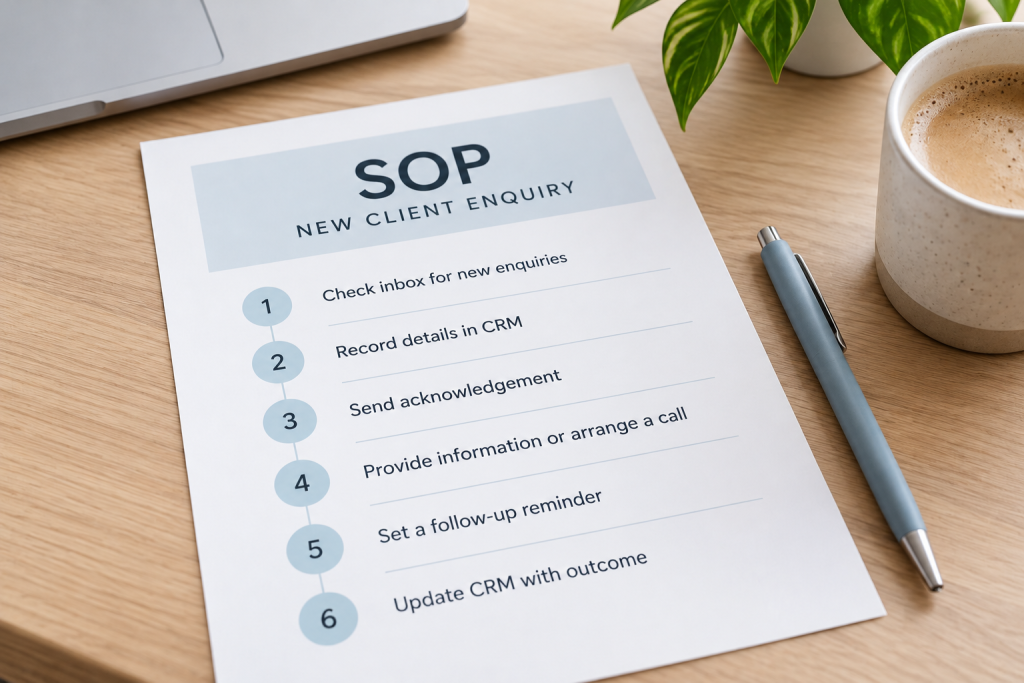
For example, imagine a business receives a new customer enquiry. There might be several steps involved:
- Check the enquiry and identify what the customer needs.
- Record their details in the customer relationship management (CRM) system.
- Send an acknowledgement or initial response.
- Arrange a consultation or provide further information.
- Follow up if no response is received.
- Update the customer’s record to reflect the outcome.
If these steps are documented, anyone responsible for handling enquiries can follow the same process.
Without an SOP, the approach might vary depending on who picks up the enquiry, potentially leading to missed follow-ups, inconsistent communication or lost opportunities.
Why Are Standard Operating Procedures Important for Small Businesses?
It’s easy to associate SOPs with large companies, corporate departments and complicated operational manuals.
However, smaller businesses often have an even greater need for clear processes because so much responsibility rests with one or two people.
Here are some of the ways SOPs can help.
1. Consistency Across Your Business
When tasks are completed differently each time, mistakes and inconsistencies can creep in.
A documented procedure provides a clear reference point, helping to ensure that customers receive a consistent standard of service and important steps aren’t overlooked.
This is particularly useful for activities such as client onboarding, invoicing, customer communication and administrative processes.
2. Saving Time and Reducing Repetition
How often do you find yourself explaining the same task, searching for the same information or trying to remember exactly how something was done previously?
An SOP reduces the need to repeatedly work things out from scratch.
Instead of relying on memory or lengthy explanations, you have an established process that can be followed whenever the task arises.
Over time, this can make everyday operations considerably more efficient.
3. Making Delegation Easier
One of the biggest challenges small business owners face when delegating is transferring their knowledge to someone else.
You might know exactly how you want something done, but communicating that knowledge isn’t always straightforward.
A well-written SOP provides a starting point for handing over responsibilities to an employee, Virtual Assistant or other member of your support team.
It doesn’t eliminate the need for training or communication, but it makes the process much easier.
It also gives the person carrying out the work something to refer back to, rather than needing to ask the same questions repeatedly.
If you’re considering outsourcing some of your business activities, understanding the difference between a Virtual Assistant and an Online Business Manager can help you decide which level of support is right for you.
4. Supporting Business Continuity
What happens if you’re unexpectedly unavailable?
Perhaps you’re unwell, taking a holiday or dealing with something that requires your immediate attention.
If essential processes exist only in your head, even straightforward tasks can become difficult for someone else to manage.
Documenting those processes means important business activities can continue with less disruption.
For small businesses where the owner plays a central role in daily operations, this can be particularly valuable.
5. Identifying Opportunities for Improvement
There’s another benefit to writing down your processes that isn’t always immediately obvious.
Documenting how you do something encourages you to examine whether it’s actually the best way of doing it.
You might discover that you’re entering the same information into several systems, completing unnecessary steps or manually carrying out tasks that could be simplified.
Creating an SOP isn’t just about recording how things have always been done. It’s also an opportunity to make those processes better.
Does Every Small Business Really Need SOPs?
Not every activity in your business requires a detailed set of written instructions.
If you’re a sole trader with relatively straightforward operations, you probably don’t need an extensive library of procedures covering every aspect of your working day.
However, almost every business has recurring tasks that would benefit from some form of documentation.
The key is to be practical.
Start by considering:
- Which tasks do I complete regularly?
- Which activities involve several steps?
- What would someone else need to know if they took over this responsibility?
- Are there tasks where mistakes could cause delays, additional costs or unhappy customers?
- Which processes do I frequently have to explain?
You may find that just a handful of well-written SOPs could make a noticeable difference to how your business operates.
Examples of Standard Operating Procedures for Small Businesses
SOPs can be created for almost any repeatable business activity.
Here are some practical examples.
| Business area | Example SOP |
|---|---|
| Customer service | Responding to new customer enquiries |
| Administration | Managing and organising incoming emails |
| Finance | Preparing, issuing and recording invoices |
| Client management | Onboarding new clients |
| Marketing | Preparing, approving and publishing social media content |
| Diary management | Scheduling, confirming and rearranging appointments |
| Project management | Creating and updating project records |
| Document management | Naming, storing and archiving business files |
| Customer relationships | Following up outstanding quotations |
| Business operations | Handling customer complaints or service issues |
You don’t need to document all of these.
Focus on the activities that are most important to your business and those where having clear instructions would be genuinely useful.
How to Create a Standard Operating Procedure
Creating an SOP doesn’t require specialist software or complicated templates.
A simple Word document, Google Doc or shared digital workspace can be perfectly adequate.
The important thing is that the instructions are clear, accurate and easy to follow.
Step 1: Choose a Process to Document
Start with a task you complete regularly.
Ideally, choose something relatively straightforward, such as responding to a new enquiry, preparing an invoice or scheduling an appointment.
Trying to document your entire business at once is likely to become overwhelming.
Step 2: Identify the Purpose
Explain what the procedure is intended to achieve.
For example:
Purpose: To ensure all new customer enquiries are acknowledged promptly, recorded accurately and followed up appropriately.
This gives anyone reading the document a clear understanding of why the process matters.
Step 3: Record Each Step
Work through the task as you would normally complete it, writing down each action in the correct order.
Be specific enough that someone unfamiliar with the process could understand what needs to happen.
Include relevant information such as which systems to use, where documents are stored, any deadlines and who to contact if something goes wrong.
Screenshots can be particularly helpful when documenting tasks involving software.
Step 4: Include Responsibilities and Exceptions
Make it clear who is responsible for completing the task and whether any stages require approval.
It’s also worth considering what should happen when something doesn’t go according to plan.
For example, what happens if a customer provides incomplete information, an invoice is disputed or a booking needs to be cancelled?
An effective SOP should provide guidance for common exceptions, not just the ideal scenario.
Step 5: Test the Procedure
One of the best ways to check whether an SOP is effective is to ask someone else to follow it.
Can they complete the task without repeatedly asking for clarification?
Are any instructions missing or unclear?
Testing helps identify gaps that might not be obvious to the person who originally developed the process.
Step 6: Review and Update It
Business processes change.
You might introduce new software, adjust your services or discover a more efficient way of working.
An SOP should reflect how your business currently operates, rather than how things were done several years ago.
Include a review date or update the document whenever a significant change takes place.
Some procedures may also need to reflect legal requirements. For example, if your business collects or stores customer information, the UK Government’s guidance on data protection for businesses explains the basic responsibilities involved in handling personal information.
A Simple Example of an SOP
To illustrate how straightforward an SOP can be, here’s a basic example for handling new client enquiries.
SOP Title: New Client Enquiry Management
Purpose: To ensure enquiries are recorded, acknowledged and followed up consistently.
Responsible Person: Business owner or designated administrator.
Procedure:
- Check the business inbox for new enquiries.
- Review the enquiry and confirm whether sufficient information has been provided.
- Record the prospective client’s contact details and enquiry in the CRM system.
- Send an acknowledgement within the business’s agreed response timeframe.
- Provide the relevant information or arrange an introductory consultation.
- Update the CRM with the date and details of the response.
- Create a follow-up reminder if further action is required.
- Record the final outcome and close or progress the enquiry as appropriate.
Additional Notes: Any unusual requests, complaints or enquiries requiring specialist advice should be referred to the business owner.
Review: Update whenever the enquiry management process changes.
Of course, a real SOP would include more specific details about the systems used, templates, response times and any relevant internal policies.
But the basic structure is often as simple as that.
Where Should You Store Your SOPs?
An SOP is only useful if the people who need it can actually find it.
There’s little point creating detailed instructions if they’re buried in an overflowing inbox or saved somewhere nobody remembers.
Depending on how your business operates, you might choose to store your procedures in:
- Google Drive or Microsoft SharePoint: Useful for organising documents in shared folders.
- Trello: Procedures can be linked to relevant boards, cards or recurring tasks.
- Notion: Can provide a central knowledge base for processes and business information.
- A shared operations manual: A structured collection of documents organised by business function.
You don’t necessarily need to invest in another platform.
Often, the simplest approach is to use a system you’re already familiar with.
Make sure documents are clearly named, access permissions are appropriate and everyone knows where to find the latest version.
For sensitive activities, such as financial administration or handling personal data, your procedures should also explain the relevant security requirements. Passwords and other confidential credentials should be managed securely rather than written directly into an SOP.
If your procedures involve handling personal data, it’s important to understand your responsibilities under UK data protection legislation. The Information Commissioner’s Office (ICO) provides guidance on documenting data processing activities, including record-keeping and keeping documentation up to date.
Common Mistakes When Creating SOPs
Whilst SOPs are designed to make life easier, it’s possible to overcomplicate them.
Some common mistakes include:
Making them unnecessarily detailed. A procedure should contain enough information to complete the task correctly, without becoming so lengthy that nobody wants to read it.
Using complicated language. Write instructions in plain English. The person following the process shouldn’t need to decipher technical jargon.
Documenting inefficient processes. Don’t automatically preserve a process simply because it’s how things have always been done. Consider whether it could be improved first.
Failing to involve the people doing the work. Someone who regularly completes a task may have valuable insight into how it actually works.
Creating documents and forgetting about them. Outdated instructions can sometimes cause more problems than having no instructions at all.
Above all, remember that SOPs should support your business, not create unnecessary administration.
How SOPs Help Your Business Become Less Dependent on You
For many small business owners, one of the greatest challenges is that they’re involved in almost every aspect of daily operations.
They know where everything is, how each system works, which customers need particular attention and what needs to happen next.
That knowledge is valuable, but it can also create a bottleneck.
If every question, decision and routine task has to come back to the business owner, there’s a limit to how much responsibility can be shared.
Documented processes help reduce that dependency.
When routine activities are clearly explained, other people can take greater ownership of their responsibilities.
This doesn’t mean removing the business owner’s involvement from important decisions. It means making sure their time and attention aren’t constantly required for tasks that could be managed independently.
As a Virtual Assistant and Online Business Manager, I’ve seen how much difference well-organised systems and clear processes can make to everyday business operations.
Sometimes the improvement comes from introducing a new system. Other times, it’s simply a matter of organising existing information, establishing a consistent way of working and making sure everyone understands their responsibilities.
And often, the simplest changes are the most useful.
If you’re considering introducing additional support but aren’t sure what level of assistance your business needs, my VA or OBM quiz can help you explore the options.
Getting Started With SOPs in Your Business
If you’ve never created an SOP before, don’t feel you need to set aside several days to document everything.
Start small.
Choose one task that you complete frequently and write down exactly how you do it.
The next time you complete that task, follow your instructions and check whether anything is missing.
Make any necessary adjustments, then save the document somewhere accessible.
Once you’ve established a process that works, move on to another task.
Over time, you’ll begin building a useful collection of procedures that support the way your business operates.
The aim isn’t to create more paperwork. It’s to make your business easier to manage.
Need Help Organising Your Business Processes?
Creating Standard Operating Procedures is just one part of establishing effective business systems.
Whether you’re looking to improve your existing processes, organise your administration or introduce more structure into your daily operations, having the right support can make a considerable difference.
At Alison Quinn Virtual Assistant, I provide Virtual Assistant and Online Business Management support to businesses that need practical, reliable help with their administration, systems and operations.
Whether you need help documenting existing processes, improving your systems or managing day-to-day operations, I’d be happy to discuss your requirements.
Get in touch to find out how I can support your business.


